Software product · Education
School Management System: run every campus from one browser
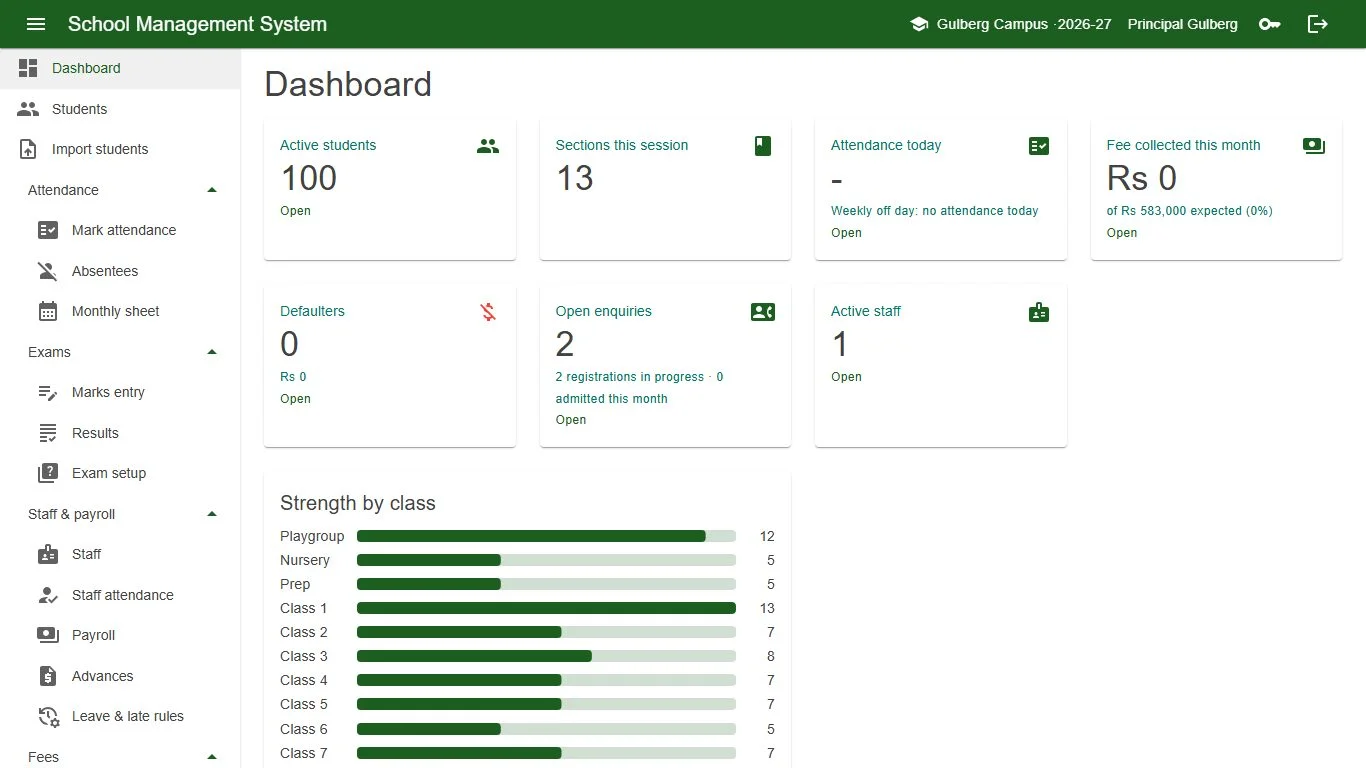
Admissions, attendance, fees, exams, payroll and parent communication in one system. The owner, principal, front office, accountant, teachers and parents each see exactly what they need, on a computer, tablet or phone, with nothing to install.
- Enquiry to admission, with siblings linked automatically
- Monthly fee vouchers, collection, arrears and defaulters
- WhatsApp absence alerts, notices, fee reminders and results
- Parent portal and combined reports across all campuses
Why our School Management System
Clear records, fewer arguments, happier parents
Built around the real work of a school office, from the first enquiry to the leaving certificate.
Fees nobody has to chase by hand
Vouchers for the whole campus in one run, late fines and concessions applied by rule, unpaid balances carried as arrears, and automatic WhatsApp reminders before and after the due date.
Parents always in the loop
Absence alerts the same day, notices to a class or the whole campus, results the moment they are published, and a parent portal with attendance, fees, results and voucher downloads.
Nothing changes without a trace
Roles decide who may do what, receipts are reversed rather than edited, published results lock marks, and the audit log records every change with old and new values.
Features
Every module a school needs
Each user has one role: Super Admin, Campus Admin, Front Office, Accountant, Teacher or Parent. The menu shows only what that role may use.
Admissions
Enquiries with follow-up dates, registrations with test and decision, and admission with an automatic admission number. Import existing students from Excel, with every row checked first.
Student records
Profile, photo, guardians, siblings, documents, attendance and fee ledger in one place. Withdrawal, school leaving and character certificates with their own numbers.
Attendance
Class teachers mark Present, Absent, Leave or Late in a few clicks and send WhatsApp absence alerts. Daily absentee list and a monthly sheet per section.
Fees and vouchers
Fee heads and structure per class, concessions such as sibling or staff child, late fines, voucher runs for a campus, class or section, bank, school and student copies on one page.
Fee collection
Collect by voucher or admission number, partial payments applied to arrears first, receipts that are reversed rather than edited, defaulters list and daily collection report.
Exams and report cards
Exam terms with weights, papers, date sheet, grade bands and pass marks. Teachers enter and submit marks; results with positions, report cards and result sheets as PDF.
Staff and payroll
Staff records and salary structure, staff attendance, leave quotas and late rules, advances with monthly instalments, salary sheet and payslips.
Communication
Notices to a campus, class, section or chosen students, also on WhatsApp. Automatic fee and defaulter reminders, result messages and a full message log.
Parent portal
Parents sign in with their mobile number and see every child, across campuses: attendance, fee vouchers to download, fee history, published results and notices.
Timetable and promotion
Bell schedule and section timetables with teacher clash checks, My timetable for teachers, and end-of-year promotion that promotes, detains or graduates a whole class.
Library and transport
Book catalogue with accession numbers, issue, return and fines. Routes, stops, vehicles and riders, billed on a separate transport voucher or on the school fee voucher.
Reports and multi-campus
Class strength, attendance, fee collection, fee summary, defaulters, results and staff reports in Excel or PDF. Head office sees every campus side by side.
Screenshots
See it in action
Real screens from the School Management System, using a sample school group.
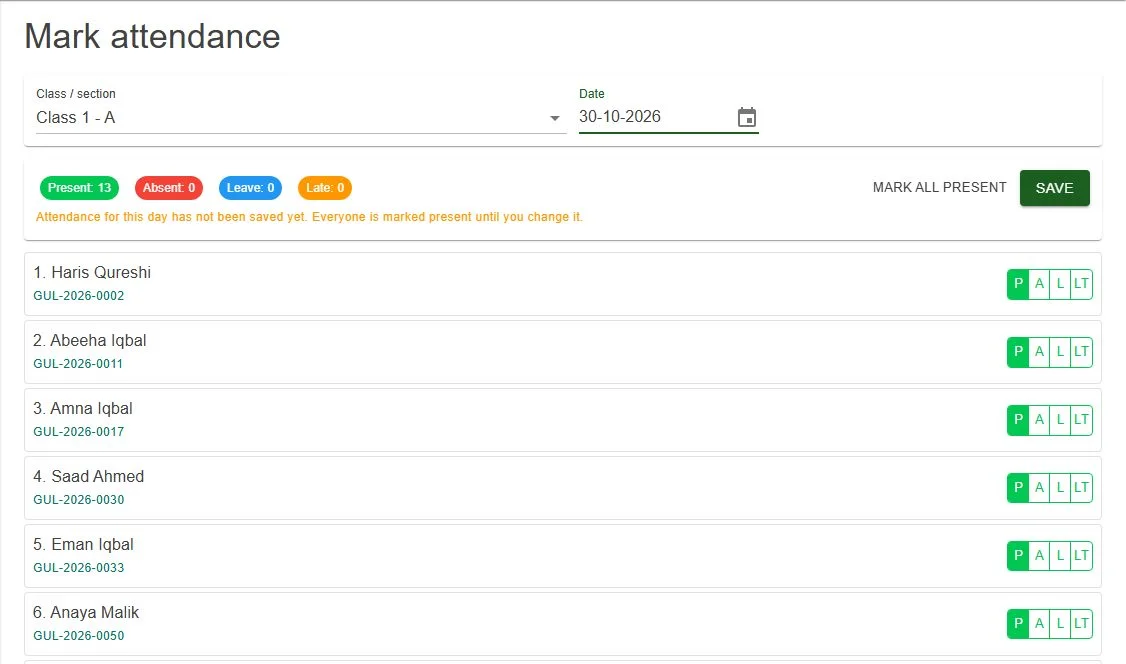
Mark attendanceEveryone starts as present; the teacher changes the few who are absent, on leave or late, saves and sends WhatsApp alerts. 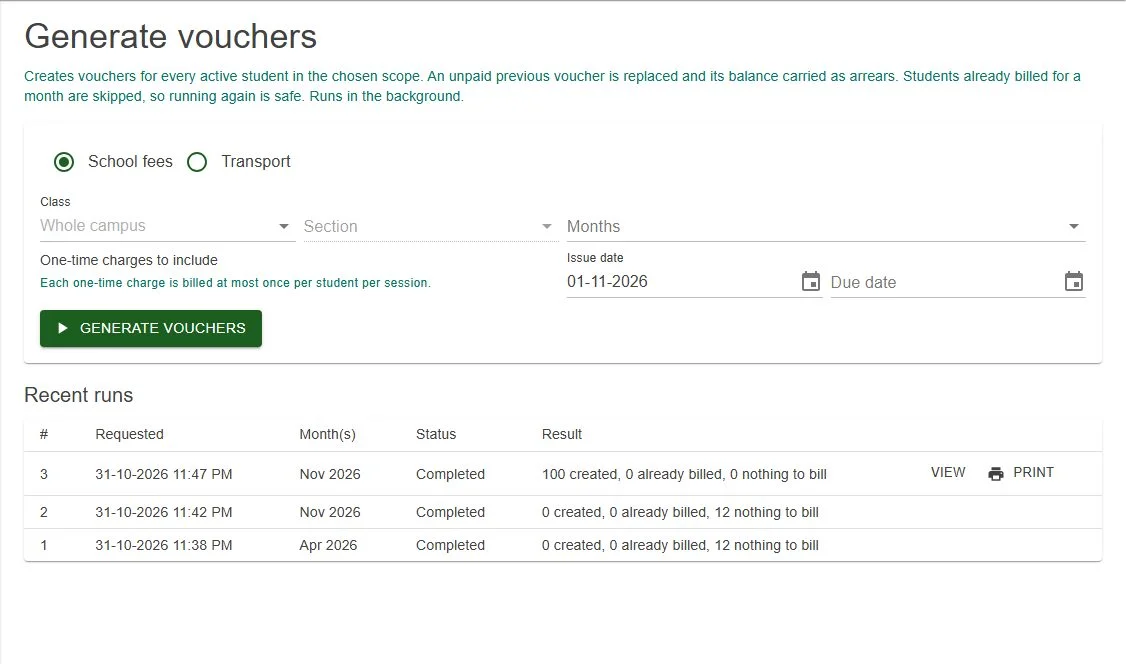
Generate vouchersBill a whole campus, a class or a section for one or more months. Running it again never bills a student twice. 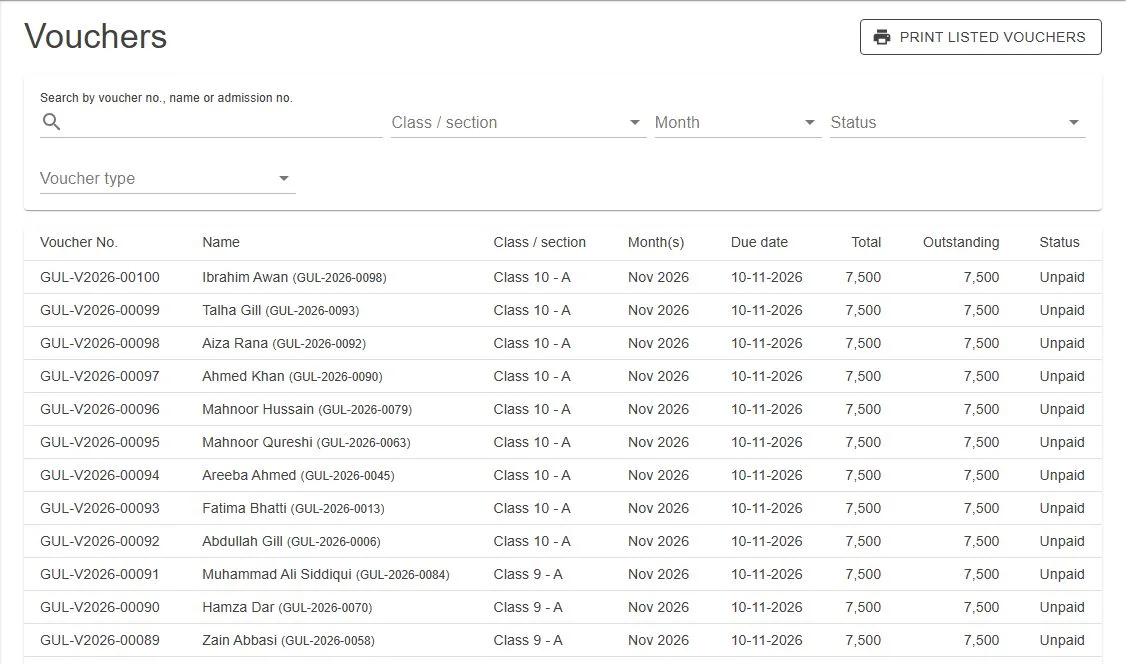
Fee vouchersEvery voucher with its month, due date, total, outstanding amount and status, ready to print or collect. 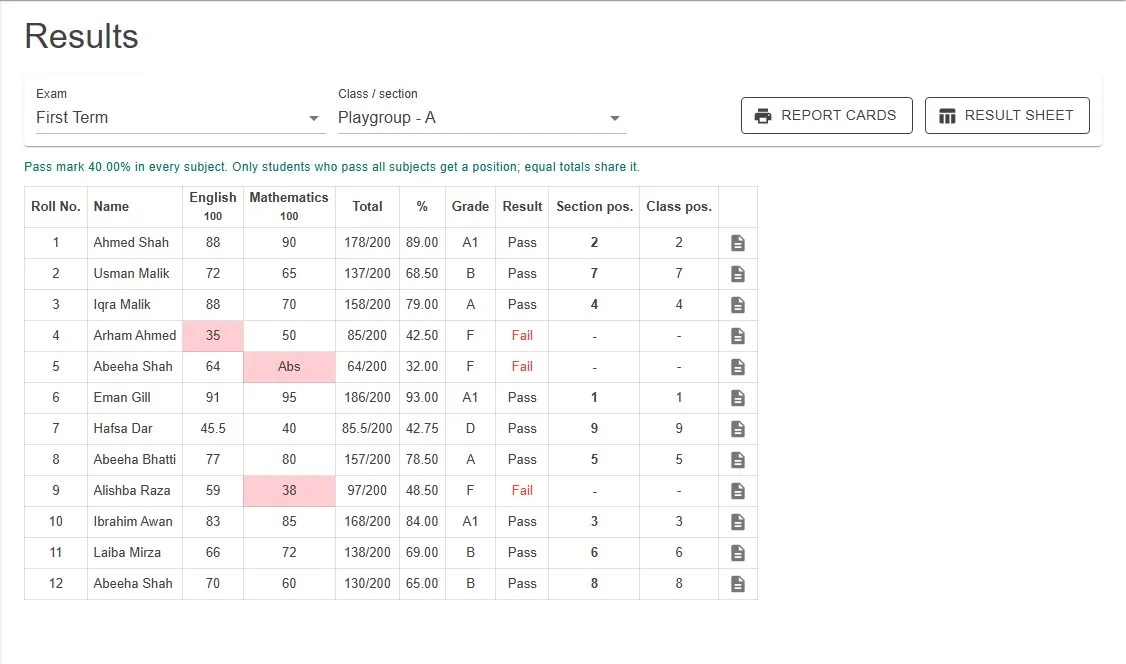
ResultsMarks, totals, percentage, grade, pass or fail, and positions in the section and class, with report cards in one click. 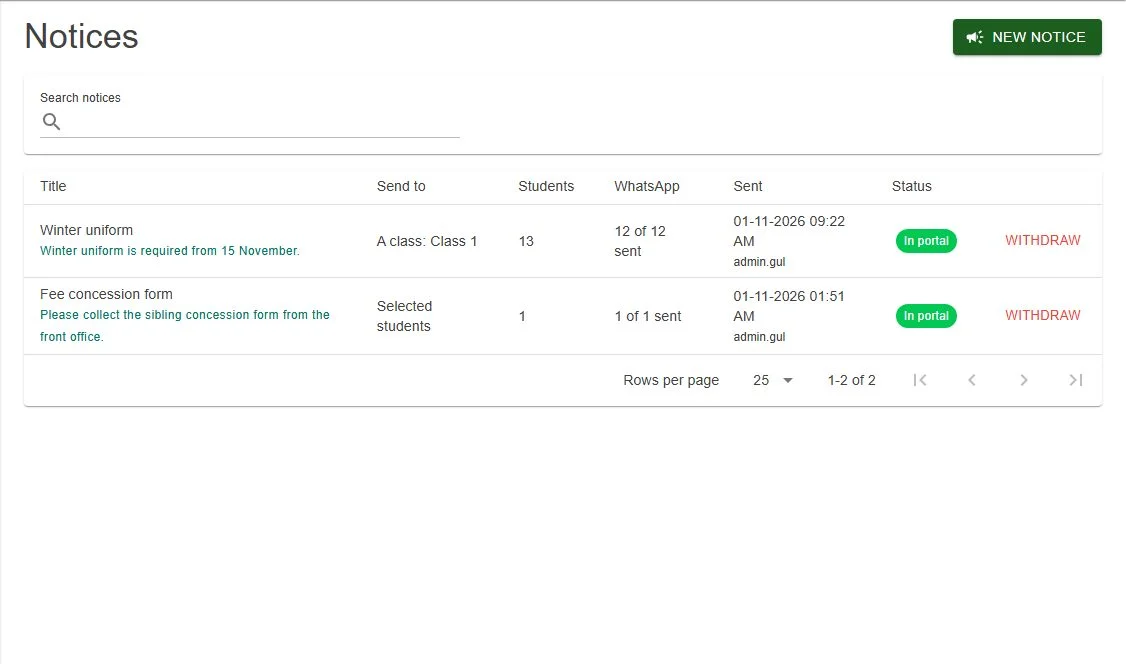
NoticesNotices sent to a class or chosen students, shown in the parent portal and delivered on WhatsApp. 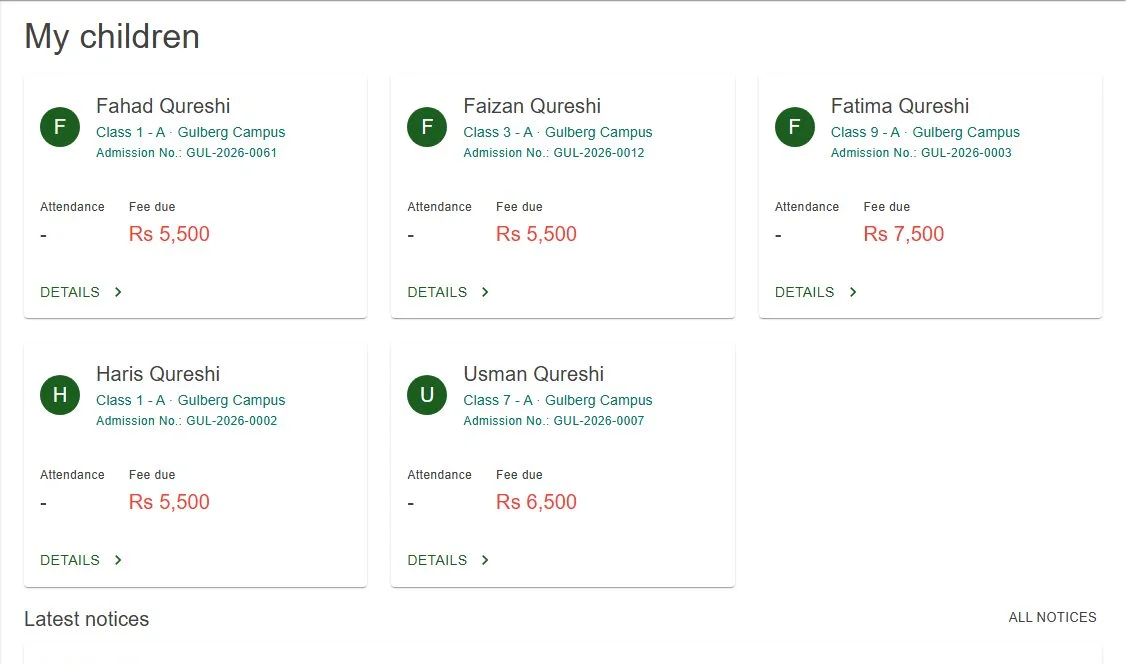
Parent portalOne card per child with attendance and fee due, and the latest notices from the school. 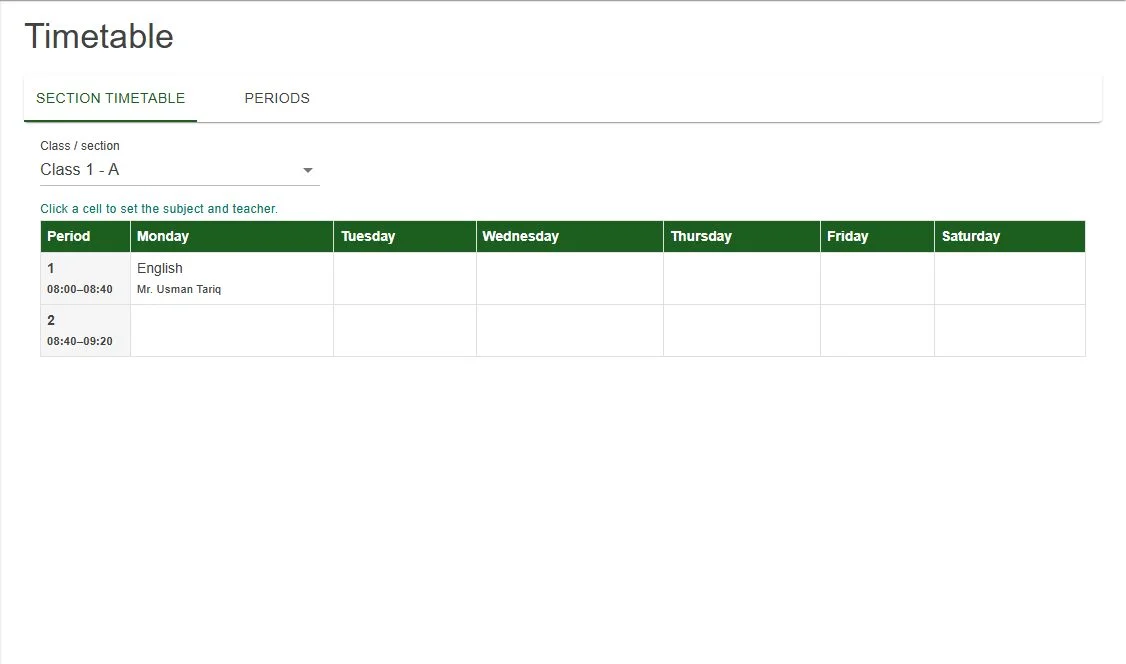
TimetableClick a cell to set the subject and teacher; a teacher can never be booked into two classes at once. 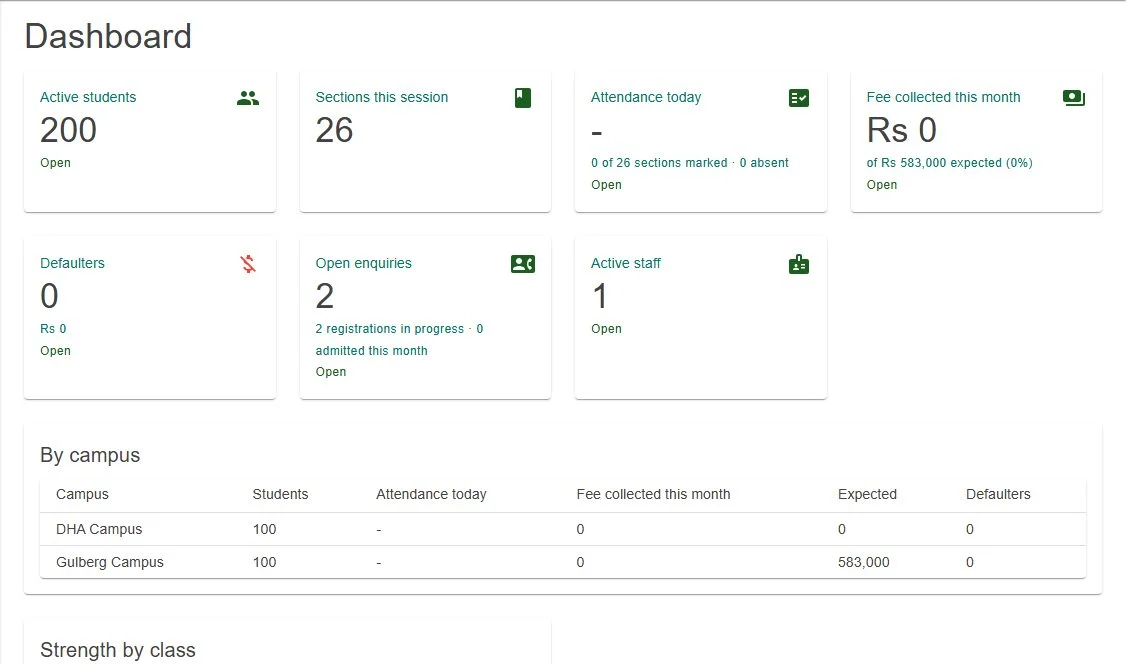
Head office viewWith All campuses selected, the owner sees students, attendance, fees and defaulters for each campus.
How it works
A student's year, from enquiry to result
Details are entered once and used everywhere: on vouchers, attendance sheets, report cards and the parent portal.
Admission
An enquiry becomes a registration, then an admission with a class, section and admission number.
Attendance
The class teacher marks the day; parents of absent students get a WhatsApp alert.
Fees
Vouchers are issued each month, payments recorded, and reminders sent automatically.
Results
Teachers submit marks, the result is published, and parents see it in the portal.
System requirements
What you need
Nothing to install on staff computers or parents' phones.
| Item | Requirement |
|---|---|
| Hosting | Our cloud, or your school's own server |
| Devices | Any computer, tablet or phone with Chrome, Edge or Firefox |
| Printer | Any A4 printer for vouchers, report cards, certificates and payslips |
| A WhatsApp Business number for alerts, notices, reminders and parent logins | |
| Your data | Existing students and guardians can be imported from an Excel template |
Licensing
Set up the way your school works
Your currency, sessions, classes, fee structure and grading are configured for your school.
- Free demo with your own setupWe show the system with your classes, fee heads and report card format before you decide.
- Cloud or your own serverLet us host it so staff and parents can sign in from anywhere, or run it on a server at your school.
- One school or many campusesEach campus has its own code, principal, calendar, late fine rules and settings, while head office sees the combined figures.
- Setup, import and trainingWe help you set up the session, import students from Excel, create parent logins and train your staff.
Frequently asked questions
Can schools outside Pakistan use it?
Yes. Sessions, classes, fee heads, concessions, grading, report card header, school details and message wording are all set by the school, so it works for schools in any country.
Is it suitable for a small school as well as a group of campuses?
Yes. A single school uses one campus. A group adds campuses, each with its own code and principal, and the Super Admin can see combined figures for all campuses.
Does it run in the cloud or on our own computers?
Either. We can host it on our cloud, or install it on your school's own server. In both cases staff and parents just open it in a web browser.
How are parents kept informed?
By WhatsApp: same-day absence alerts, notices, fee reminders before the due date, defaulter reminders after it, and result messages. Parents can also sign in to the parent portal with their mobile number.
Can we keep our own fee structure?
Yes. Fee heads can be monthly or one-time, with amounts per class, concessions by percentage or fixed amount, a due day and a late fine that is either fixed or per day with a maximum.
Can you bring in our existing student data?
Yes. Fill in the Excel template with your students and guardians. Every row is checked before anything is saved, and brothers and sisters are linked as siblings automatically.
How much does it cost?
It depends on the number of campuses and students and on hosting. We share a quote after a free demo, once we know what you need.
Can you add features that are not listed here?
Yes. We build custom features and reports on request. Tell us what your school needs during the demo.
See how it fits your school
Book a free demo and we will walk through admissions, fee vouchers, attendance and results using your own classes and fee structure, on our cloud or your own server.